

Furniture is where interior projects win or lose their realism — and where models gain weight fastest. Every Revit furniture family you load is a trade-off between visual detail and performance, and a library that already made those trade-offs well saves you hours per project. This is our curated Top 20: real, downloadable families from our Furniture category, organized the way you furnish — living, dining, storage, and decor — plus the 2026 trends worth designing toward.
2026 Furniture Trends That Define Interior Design
Dark woods and natural finishes
Scandinavian light woods are giving way to richer tones — walnut, smoked oak, teak — paired with textured metals and organic textiles that read beautifully in renders.
Biophilic design
Beyond adding plants: organic forms, natural material palettes, and furniture that softens the boundary between interior and landscape.
Precise geometry
Clean lines, defined angles, and modularity are back. Rectilinear furniture suits projects seeking order and contemporary minimalism — and models parametrically better, too.
Top 20 Modern Revit Furniture Families (Free Download)
Every item below is a real family in our library — click through any grid card to preview it in your browser and download it.
Sofas and Living Rooms
- Contemporary Sofa with Modern Cushions — the versatile centerpiece: clean profile, cushioned seat, works in almost any residential scene.
- Modular Sofa — sectional logic for spaces that change; combine modules to fit the room instead of the other way around.
- Modern L-Shaped Sofa — the open-plan classic that anchors a living zone without walls.
- Modern Living Room Set — sofa, seating, and tables in one coordinated family: a furnished room in a single load.
- Comprehensive Furniture Pack (RVT) — a whole project’s worth of furniture in one file; bring in the types you need via copy-paste or Transfer Project Standards.


Dining Tables and Chairs
- Dining Table Set for 6 — table plus six chairs in one family: the fastest way to furnish a dining room.
- Contemporary Dining Set — the modern-lined alternative when the project calls for lighter visual weight.
- Round Dining Set — circular table with seating, ideal for compact plans and breakout areas.
- Nesting Round Coffee Tables — two tables, one footprint; the flexible piece every living scene needs.
- Partitioned Cafe Seating — booth-style seating for hospitality, cafeterias, and co-working projects.


Storage and Kitchen Casework
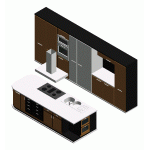
- Modular Kitchen Cabinets Family (RVT) — a complete casework system with configured types ready to transfer into your template.
- Modular Kitchen Cabinet Set with Countertop — base units and countertop resolved together, ready to lay out a kitchen.
- Kitchen Casework with Modern Glass Uppers — the display-cabinet look for contemporary kitchens.
- Pantry Cabinet with Modern Double Doors — full-height storage that reads clean in both plan and elevation.
- Storage Cabinet with Modern Double Doors — the all-purpose auxiliary piece for offices, halls, and utility rooms.



Decorative Elements and Accessories
- Open Wardrobe System — exposed storage that doubles as a design feature for bedrooms and retail.
- Decorative Room Divider Panel — zoning without walls, the open-plan staple.
- Decorative Partition with Plant Holders — divider and biophilia in one element: 2026’s trend, one family.
- Decorative Metal Panel Screen — patterned screening for facades of light and shadow indoors.
- Elegant Draped Curtain — the softness that renders need; instant realism at window openings.


How to Integrate This Furniture into Your BIM Workflow
- Explore and select in the Furniture category, using subcategories to narrow by room and style.
- Preview in 3D before downloading: every product page opens in BIMviewer.org — rotate, section, and check the level of detail in your browser, no Revit needed.
- Download and load: Insert > Load Family with the
.rfa(or open the.rvtpacks and transfer their types). Every loading method is covered in our complete family loading guide.
On versions: each download lists its minimum compatible Revit version, and Revit upgrades families forward automatically — never backward. A family saved for 2020 loads fine in 2026; a 2026 file won’t open in earlier versions.
Expanding Your Resources: From BIM to CAD
If your workflow also includes AutoCAD, our sister site LibreriaCAD offers free DWG furniture blocks for 2D documentation, with the same curation philosophy.
Frequently Asked Questions
Where can I download these free Revit furniture families?
All twenty are in the Furniture category at LibraryRevit — downloads are free with a free account, and each product page shows a 3D preview before you commit.
How do I install downloaded furniture families?
Open your project, go to Insert > Load Family, and select the .rfa. The family appears in the Project Browser under Furniture, ready to place. Full details in our loading guide.
Are these families compatible with Revit 2026?
Check each file’s listed minimum version: Revit opens families saved in older versions and upgrades them automatically, but never the reverse. Most furniture in the library targets recent versions and upgrades cleanly to 2026.
What does it mean that a family is “parametric”?
Its dimensions, materials, and configuration are driven by parameters you can edit from the project — one family, many types, instant updates everywhere. The full mechanic is explained in what is a Revit family.
Will furniture families slow down my Revit model?
They can — furniture is a common source of model weight. Keep it under control: prefer lean geometry for repeated pieces, save high detail for hero furniture near the camera, and preview polygon-heavy candidates in the browser before loading. A furnished model that stays fast is a curation exercise.
Furnish Faster
Twenty real families, four rooms covered, zero modeling from scratch. Start at the Furniture category, preview in 3D, and load what fits — and if you build furniture yourself, share it with the community and earn Premium while you’re at it.


